Vibe Coding an AI Scene Analyzer
I built a tool that analyzes screenplay scenes using my own methodology. Pulled from the stuff I've been posting on my blog. It took an afternoon. And I don't know how to code.
What I did is called vibe coding. The term comes from Andrej Karpathy, one of the founding researchers at OpenAI. The idea is simple: you describe what you want in plain language, let the AI generate the code, and steer by feel and results. You're not reading every line and understanding every function. You're directing. Making calls. Iterating when something breaks.
A skill set we scribblers already have.
The Problem I Wanted to Solve
My blog is full of posts about craft. WANT. Scene and Sequel. Escalation through resistance, reaction, and new tactics. All the frameworks I've internalized from decades of professional scribbling and breaking story in rooms.
A post can explain those ideas. What it can't do is sit next to you at three in the morning while you're staring at a scene that feels dead and say, "This is where it's breaking, and this is why."
I wanted something that could read an actual scene and respond using my blog’s database. Not generic AI notes. Notes shaped by the specific frameworks I use when I give real feedback.
How the Vibing Actually Worked
I used Claude as a collaborator, not as a black box that spits out code while I nod and pretend to understand. We worked through it together, step by step, with explanations at every stage.
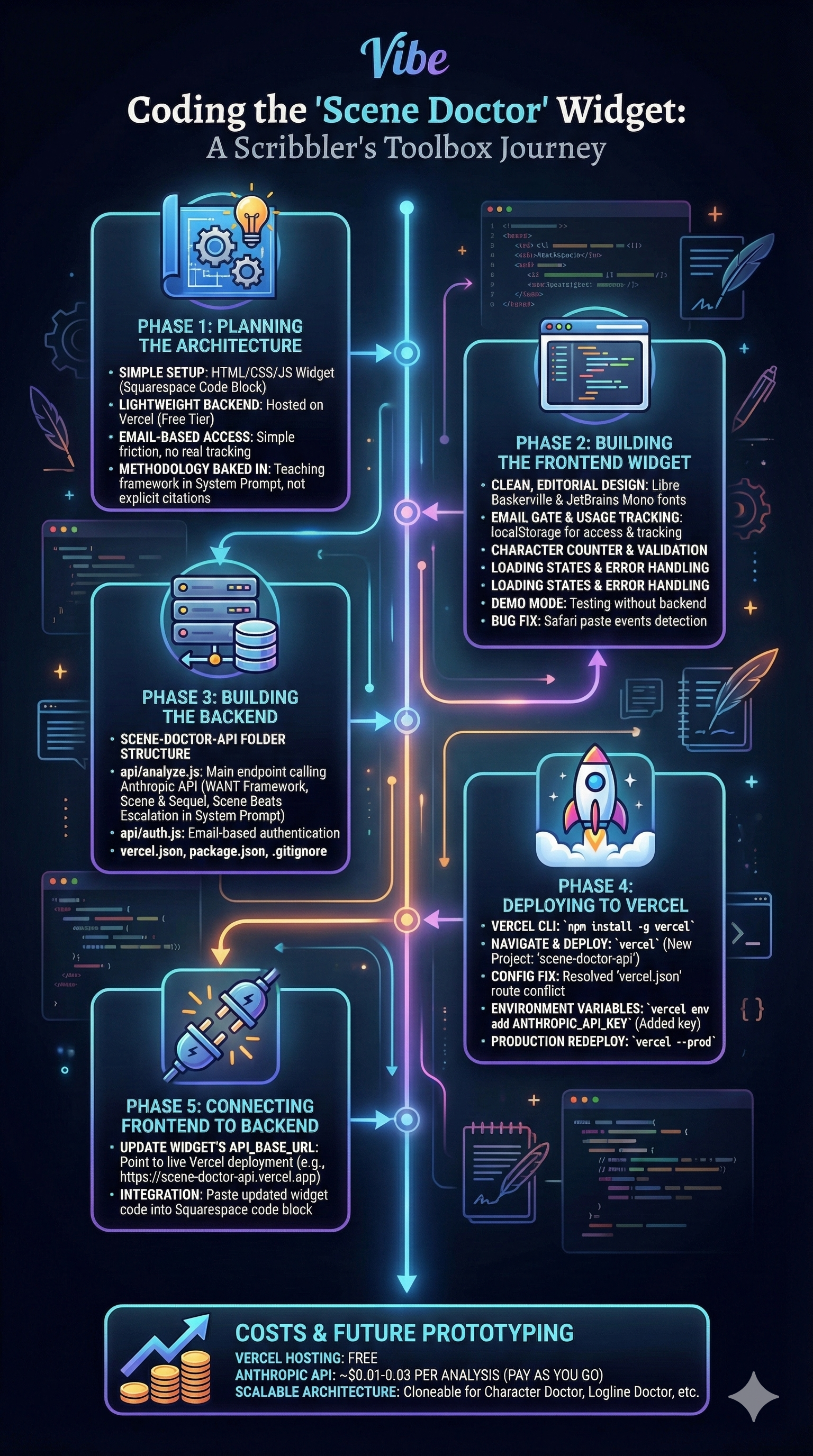
Step 1: Strip it down to the simplest possible setup
I didn't want a heavy app or ongoing maintenance. The solution was a small HTML widget embedded on my site, paired with a lightweight backend hosted on Vercel's free tier. No servers to manage. No monthly hosting bills.
Step 2: Build the front end
Claude generated the HTML, CSS, and JavaScript for the widget. Clean layout. Email gate. Character counter. Loading states. All the little details.
When the paste function failed in Safari, Claude diagnosed the issue and fixed it in under a minute. I had absolutely no idea why Safari was flailing. Claude did.
Step 3: Build the backend
We translated some of my scene methodology into a system prompt. WANT. Scene and Sequel. Escalation through resistance, reaction, and new tactics. The same questions I ask myself when something's not working and I’m trying to figure out why.
The backend sends the scene to the API with that context and returns the analysis.
Step 4: Deploy it
Claude walked me through installing Vercel's command line tool, setting environment variables, and pushing everything live. I was copying and pasting terminal commands without fully understanding the code. But I always knew what each step was doing and how to recover when something broke.
By the end of the afternoon, the tool was live on my site.
What This Cost Me
Hosting: free. API usage: pennies per run. Time: one focused afternoon. Programming knowledge: almost none.
At one point I edited a config file in TextEdit. The apogee of my coding expertise.
Why Vibe Coding Matters for Scribblers
The distance between "I wish this existed" and "I built a rough version of this" has collapsed.
Vibe coding doesn't require you to learn a programming language. It requires you to describe a problem clearly, notice when something feels wrong, and keep asking better questions.
That's what we do every day in a room. We just call it breaking story.
If you want to try the Scene Doctor, you can check it out on my site.
But really – If I can vibe code a working widget, you totally can too.